Lucid
Lucid for Typora
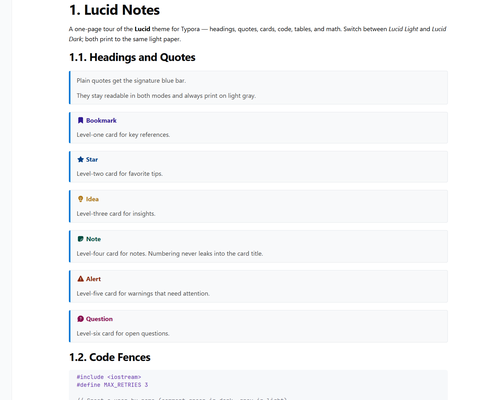
A fluent-based theme tuned for long study notes. Two locked variants — Lucid Light (always light) and Lucid Dark (always dark) — that display the way you like and always print to the same light paper.
Features
- Locked light / dark — no OS-following surprises
-
Numbered headings + outline (
1.,1.1.,2.3.1.) in content, sidebar, and PDF bookmarks - Blue-bar quotes plus six icon cards: Bookmark, Star, Idea, Note, Alert, Question
- Code fences in JetBrains Mono; dark variant uses a VS 2017-inspired palette
- Improved PDF export — tabular tables, clean math, icon cards, no stray section numbers
Fonts
Segoe UI for body/titles (built into Windows), JetBrains Mono for code
(winget install JetBrains.JetBrainsMono), Cambria Math for formulas.
Installation
- Download and unzip the theme.
- Copy
lucid-light.cssandlucid-dark.cssinto Typora’s theme folder. - Restart Typora and select Lucid Light or Lucid Dark from the Themes menu.
Tip: export PDFs from Lucid Light — both files print identically, and Chromium paints dark page margins when exporting from any dark UI.