Claudette
Claudette
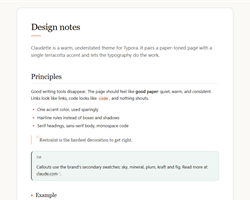
A warm, understated theme for Typora, in light and dark. Paper-toned background, a single terracotta accent, serif headings, sans-serif body text and hairline rules. Restraint over ornament.


Features
-
Light and dark —
claudette.cssandclaudette-dark.css; the dark file imports the light one and only swaps tokens. -
Warm paper palette —
#faf9f5page,#f2f0e9sidebar, alpha hairlines, near-black text and one terracotta accent used sparingly. - Editorial typography — serif headings at weight 400, a lead paragraph after H1, uppercase H6 labels.
-
Quiet code blocks — hairline border,
.75remradius, language pill, low-saturation syntax colors. - Hairline tables — horizontal rules only, uppercase headers, subtle row hover.
-
Paper sheet and callouts — the document sits on a white sheet over the ivory page;
> [!NOTE]-style callouts are tinted with the brand’s secondary swatches. - Whole-app styling — sidebar, outline, quick-open, search, menus, dialogs, source mode and scrollbars all match.
- Print-ready — decorations are stripped on export.
Installation
- Download
claudette.cssandclaudette-dark.css. - Open Typora Preferences → Appearance → Open Theme Folder.
- Copy both files into that folder.
- Restart Typora and select Claudette or Claudette Dark from the Themes menu.
Fonts
No fonts are bundled. Claudette prefers Source Serif 4, Inter and JetBrains Mono when installed, and falls back to Georgia / Segoe UI / Consolas and their CJK counterparts otherwise. Edit the --font-* variables in :root to change them.