Purclaude
Purclaude
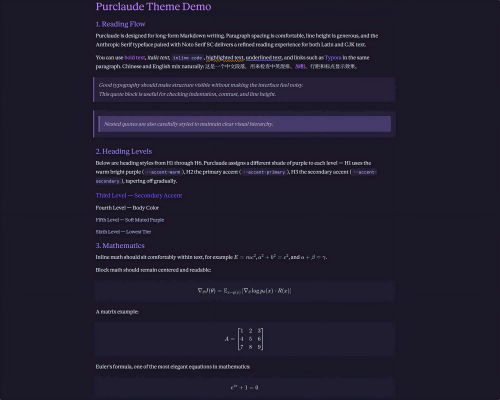
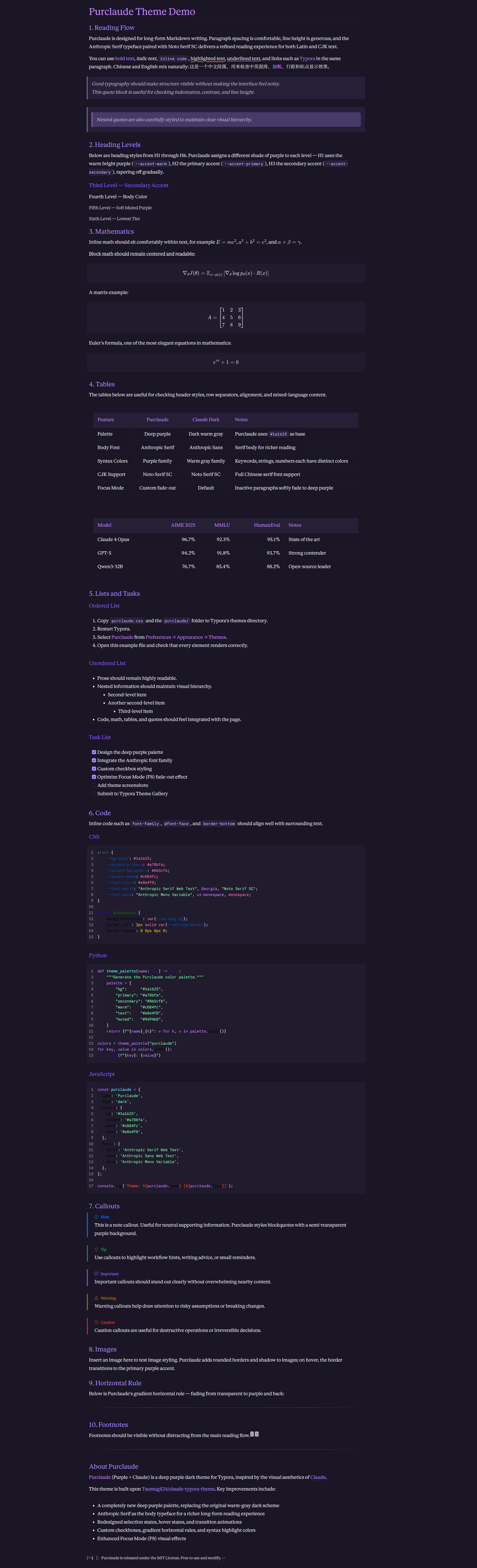
A deep purple dark theme for Typora, inspired by Claude visual aesthetics. Built upon Tsumugii24/claude-typora-theme, redesigned with an immersive purple palette, refined interactions, and polished typographic details.
Screenshots
Features
-
Deep Purple Palette — Rich, eye-friendly purple tones with
#1a1625as base color. - Elegant Typography — Anthropic Serif for body text, Anthropic Sans for UI, Anthropic Mono for code.
- Syntax Highlighting — Carefully tuned purple-family colors for code blocks.
- Smooth Interactions — Polished hover states, selections, and CSS transition animations.
- CJK Support — Full Chinese typography support with Noto Serif SC variable font.
- Focus Mode — Non-active paragraphs softly fade to deep purple for distraction-free writing.
- Custom UI Details — Styled checkboxes, gradient horizontal rules, context menu animations, and scrollbar.
Installation
- Download and unzip the release.
- Copy
purclaude.cssand thepurclaude/folder into Typora’s theme directory:-
Windows:
%APPDATA%\Typora\themes\ -
macOS:
~/Library/Application Support/Typora/themes/ -
Linux:
~/.config/Typora/themes/
-
Windows:
- Restart Typora and select Purclaude from the Themes menu.
Credits
- Built upon Tsumugii24/claude-typora-theme (which builds on blaxisomu/CLAUDE-Typora)
- Visual inspiration from claude.ai
- Fonts: Anthropic Web Fonts + Noto Serif SC
Purclaude 主题
一款深紫色暗色 Typora 主题,灵感来源于 Claude 的视觉美学。基于 Tsumugii24/claude-typora-theme 进行二次开发,重新设计了沉浸式紫色调色板、交互动效与排版细节。
特性
-
深紫色调色板 — 护眼的紫色色调,以
#1a1625为基色 - 优雅排版 — 正文使用 Anthropic Serif 衬线体,UI 使用无衬线体,代码使用等宽字体
- 语法高亮 — 紫色系精心调校的代码块配色
- 流畅交互 — 悬停态、选中态和 CSS 过渡动画
- CJK 支持 — 使用 Noto Serif SC 可变字体提供完整中文排版
- 聚焦模式 — 非活跃段落柔和淡出,打造无干扰写作体验
- 自定义 UI — 复选框、渐变分隔线、上下文菜单动画、滚动条样式
安装
- 下载并解压。
- 将
purclaude.css和purclaude/文件夹复制到 Typora 主题目录:-
Windows:
%APPDATA%\Typora\themes\ -
macOS:
~/Library/Application Support/Typora/themes/ -
Linux:
~/.config/Typora/themes/
-
Windows:
- 重启 Typora,在主题菜单中选择 Purclaude。
致谢
- 基于 Tsumugii24/claude-typora-theme(该项目基于 blaxisomu/CLAUDE-Typora)
- 视觉灵感来源于 claude.ai
- 字体:Anthropic Web Fonts + Noto Serif SC